
Why You Can’t Rely on Automated Accessibility Testing Tools or AI to Achieve Website Accessibility Regulatory Compliance for Your Government or Agency Website
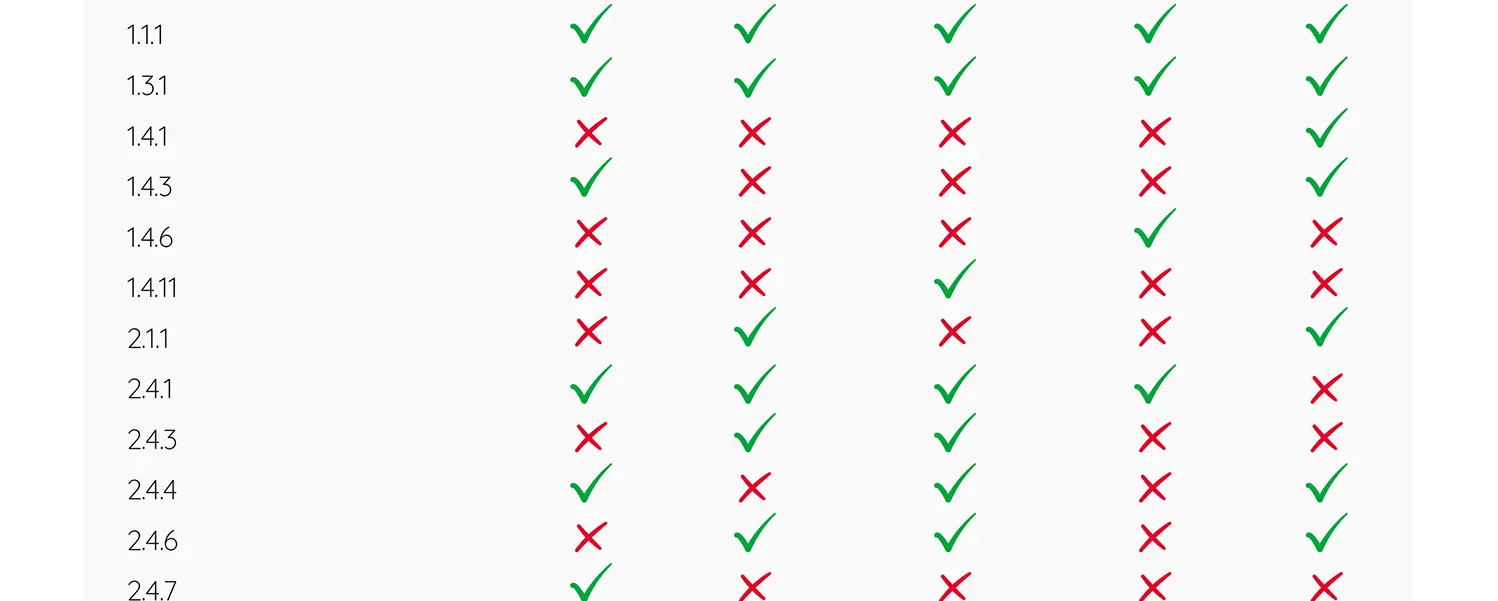
Based on a recent report, 5 popular automated accessibility testing tools collectively only test for 17 of the 55 Success Criteria to meet WCAG 2.2 AA (only 30%). Individual tools only test for 13-18% of the Success Criteria. AI tools use similar underlying technologies as automated testing tools, so they won’t produce better results.
Summary of WCAG Standards Coverage Findings by Adience
A recent report conducted by Adience on behalf of AudioEye compared the accessibility testing tools from AudioEye against similar tools from EqualWeb, Deque, UserWay, and accessiBe. In the report, these other tools are referred to as Tool A, Tool B, Tool D and Tool E so you can’t tell exactly which tool (other than AudioEye) generated which results.
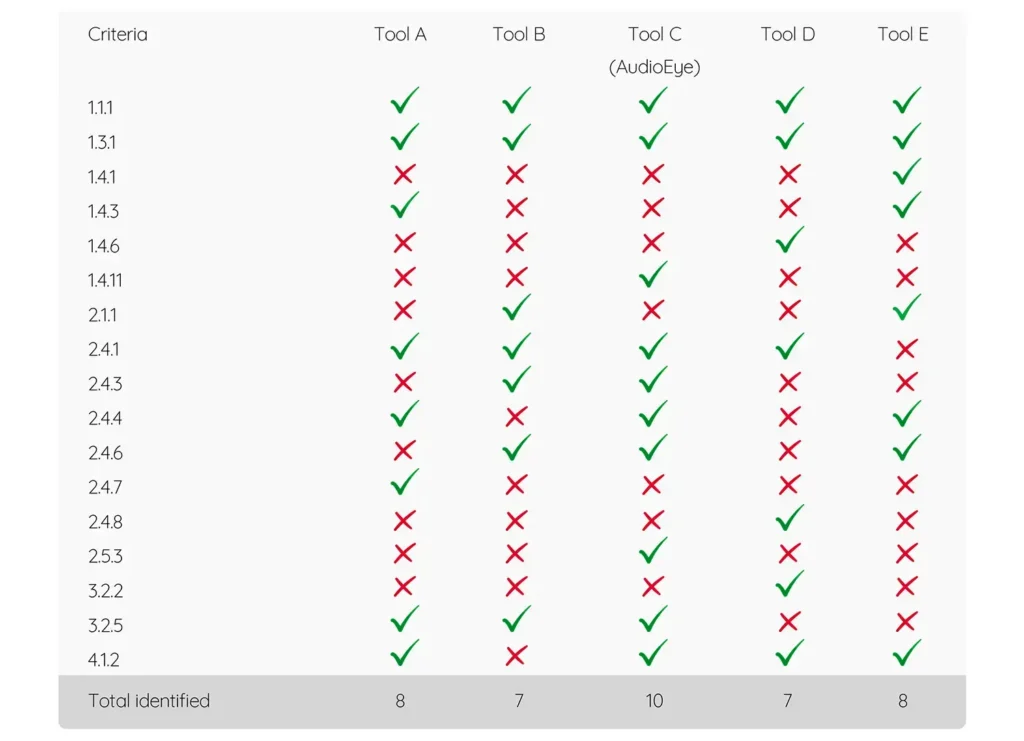
Some key takeaways:
- One tool did not test for any WCAG Level AA requirements
- Collectively, these tools only find 17 of the 55 WCAG success criteria
- All tools identify issues related to SC 1.1.1 (Non-Text Content) and 1.3.1 (Info and Relationships), although it’s unlikely that they can identify all possible failures related to these criteria.
- Individual tools only identified issues related to 7-10 WCAG success criteria
Background on Recent Accessibility Regulations
DOJ Regulations for State and Local Government Website Accessibility
The Department of Justice has released regulations requiring that state and local governments make all of their web content, including websites, apps, and social media posts, conform with Website Content Accessibility Guidelines (WCAG) 2.1 AA guidelines in order to comply with the Americans With Disabilities Act. Localities with more than 50,000 have until April 26, 2027 to meet these regulations. Smaller localities and government-funded entities that are not tied to population have until April 26, 2028.
HHS Regulations for Community Action and Health-Related Agencies
Any organizations that receive funding from the Department of Health and Human Services must ensure that all of their web content, including website, apps, kiosks and social media posts conform to WCAG 2.1AA. This includes organizations that receive funding for programs like Medicare, Medicaid, HeadStart, TANF (Temporary Assistance for Needy Families), child welfare programs, and clinical research. Organizations who have more than 15 employees must meet these requirements by May 10, 2027. Smaller organizations have until May 10, 2028.
Virginia Information Technology Access Act (VITAA) for Virginia Governments and Educational Institutions
VITAA requires that Virginia state agencies, higher education institutions, school divisions, and local governments purchase SaaS tools, websites, applications, and digital services that meet accessibility regulations. For contracts negotiated or renegotiated on or after July 1, 2025, vendors must provide an ACR or VPAT to show how their tool conforms to WCAG. While VITAA follows the technical standards specified in federal Section 508 regulations, which only requires conformance with WCAG 2.0AA, the DOJ regulations to conform with WCAG 2.1AA effectively supersedes Section 508.
WCAG Requirements That Automated Testing Tools Don’t Test For
Based on the data presented in the Adience report, automated testing tools are not testing for the following requirements.
- Captions and text alternatives for audio and video content
- Reading order and tab order match the visual order and the content makes sense when linearized
- Content layouts respond appropriately to changes in device orientation, zooming and text resizing without causing horizontal scrolling, content overlapping or content cut off
- Forms include autocomplete attributes, clear labeling for required fields, and clear error and success handling
- Keyboard operability for all interactive content, no keyboard traps and content that appears on hover can be dismissed with a keyboard
- To change of context without warning
- Any timing restrictions can be extended with a simple action
- Content does not include flashing and content that plays or moves can be paused
- The page title clearly reflects the topic or purpose of the page content
- Items that have focus are at least partially visible on screen; items that are not visible on the screen do not receive focus
- Functionality that requires dragging or complex gestures can also be accomplished with single pointer
- All interactive elements have at least 24px X 24px of clickable area or spacing around them
- The default language of the content is defined and any content within the page that is of a different language is marked up appropriately
- There is consistent navigation and identification of functionality across the site
Most website accessibility regulations also require that PDFs and other electronic documents meet WCAG requirements. Automated accessibility testing tools cannot test and remediate electronic documents. PDFs need to be tested and remediated separately from HTML content.
If automated accessibility testing tools can’t test for these issues, their corresponding overlay tools definitely can’t fix them.
Why Manual Accessibility Audits are Essential for Regulatory Compliance
It will be impossible to meet federal and state accessibility regulations if you are missing 70-80% of the issues on your site because you are only using automated testing tools.
Websites need to be tested using multiple screen readers, keyboards and other assistive technologies across multiple device types and platforms to uncover as many issues as possible. Ideally, this testing should include people who use assistive technologies daily.
Part of manual testing is evaluating content in context. An automated accessibility testing tool may be able to test for the presence of image alt text, headings and labels, but it can’t evaluate if that information is correct or relevant within the context of the larger page. Identifying WCAG issues resulting from bad information and coding errors can only be done through a manual review of the code and content.
Conclusion
While automated accessibility testing tools may help you find some low-hanging fruit issues on your site, if you need to meet specific regulations that require full WCAG conformance, automated testing tools do not go far enough to find all of the issues on your site. The only way to accomplish full WCAG conformance is to start with a comprehensive manual accessibility audit, followed by detailed remediation and ongoing monitoring.
Ready to Get Started?
If you would like to talk about how Elevage Digital can address your specific needs, provide some details to start the conversation.