

WTF: WCAG Technique Failure – Missing Headings for Screen Readers
There’s a saying that “no ARIA is better than bad ARIA”. Does your site have accessibility errors due to bad ARIA?
In this article, we’ll look at a failure of SC 1.3.1 Info and Relationships and SC 2.4.6 Headings and Labels in which bad ARIA leads to a “conforming alternate version” not being provided.
WCAG SC 2.4.6 Headings and Labels
SC 2.4.6 requires that HTML headings are used to describe the topic or purpose of content. Screen reader users often use HTML headings as a way to navigate page content and move to specific sections of a page. If these headings are not present, it can make the page more difficult to navigate.
WCAG SC 1.3.1 Info and Relationships
SC 1.3.1 states that “Information, structure, and relationships conveyed through presentation can be programmatically determined or are available in text.” The goal is for people using screen readers and other assistive technologies to have access to the same information as sighted users.
One way to convey relationships programmatically is to use HTML headings in sequential order – an H1 for the page title, followed by H2 to introduce sub-sections. H2s may be followed by H3s, if a given section is further subdivided.
WCAG Conformance and Conforming Alternate Versions
WCAG conformance is determined on a page-by-page basis. To be considered in conformance with a particular version and level, ALL content on the page must conform. In some cases, it may not be possible to make a page fully conformant, in which case you can create a “conforming alternate version” of the content, as long as it meets 4 criteria – one of which being that the alternate version “provides all of the same information and functionality”.
WCAG Failure
A page will fail WCAG when it contains “structural markup in a way that does not represent relationships in the content”.
When evaluating a site recently, I found an example where HTML heading tags were used to mark up content that was displayed visually but hidden from screen reader users. The same heading tag was not used for the equivalent text that was being served to screen readers.
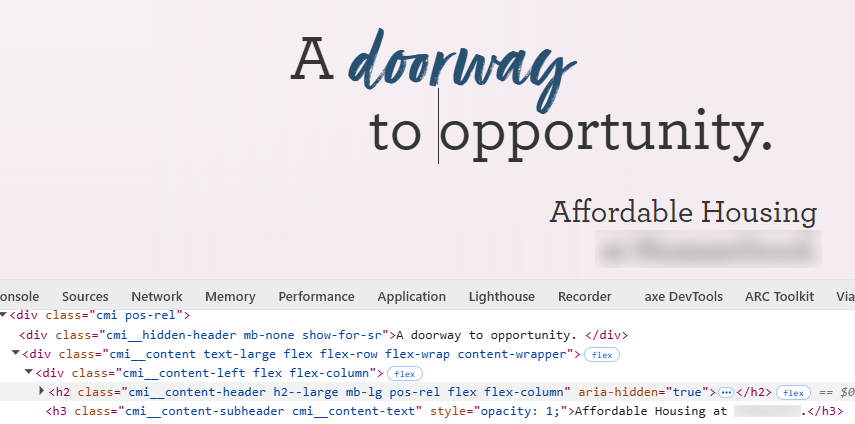
On this site, the visible version of the heading “A Doorway to Opportunity” is marked up with an H2 tag that has the aria-hidden=”true” attribute, so screen readers won’t announce it. Above the H2 is a DIV with a class “show-for-sr”. This text is announced by a screen reader, but it is not marked up with a heading tag. There is also an H3 subheading after the H2.
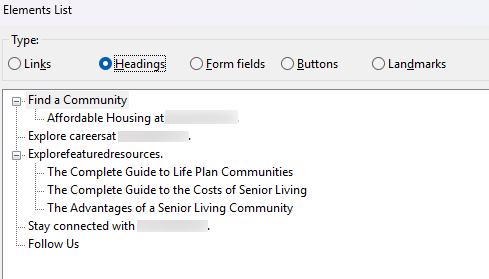
When using NVDA and opening the headings element list, the heading “A Doorway to Opportunity” is not listed. The H3 sub-heading is listed, but appears as the child of a different H2 on the page. This is not a true reflection of the content relationships that are visible on the page.
While the visible H2 content has animation associated with it, that does not seem to prevent a screen reader from announcing the content when the aria-hidden attribute is removed. It is unclear why a separate screen reader version of the heading text is provided. This appears to be an unnecessarily complex and incorrect use of ARIA, resulting in an accessibility failure.
If, for some reason, the two versions of the heading really do need to be different, the site author should add role=”heading” to the DIV containing the screen reader version, along with the corresponding level value (in this case level=”2″).
Key Takeaways
- This content fails SC 1.3.1 because the content relationships cannot be programmatically determined.
- This content fails SC 2.4.6 because HTML headings that describe the content purpose are missing for screen reader users.
- The content fails the criteria for a conforming alternate version because screen reader users are not provided with the same content and functionality.
- This example demonstrates the need for manual testing using screen readers when evaluating WCAG conformance. This kind of failure is not something an automated testing tool can be programmed to find.
The WTF: WCAG Technique Failure article series highlights real-world examples of failures for specific WCAG criteria.
Ready to Get Started?
If you would like to talk about how Elevage Digital can address your specific needs, provide some details to start the conversation.
AI Disclosure: The feature image was generated by AI. The images within the content are not AI-generated. They are taken from a recent project completed by Elevage Digital. The text was written and approved by the author. AI was used for proofreading to identify grammatical errors.