
Virginia Title II Websites Not Ready for DOJ Accessibility Regulations – Good Thing They Got a 1 Year Extension!
During the week of April 13-17, I reviewed the homepage on the main government website for 35 localities in Virginia with over 50,000 residents. Almost every website homepage had at least one significant accessibility failure. Additionally, all sites contain PDFs for non-archive content that are not properly tagged for accessibility.
The Department of Justice (DOJ) issued a ruling in 2024 that Title II entities (state and local governments) are required to meet Website Content Accessibility Guidelines (WCAG) 2.1 AA accessibility standards for all digital content and apps. The original deadline for localities with a population over 50,000 was April 24, 2026. This deadline was recently pushed back by 1 year. Localities with less than 50,000 residents have an additional year on top of that to meet the regulations.
Hopefully localities will take advantage of this additional time to bring their content into conformance.
Website Testing Methodology
I used a combination of automated and manual testing methods on each homepage.
- I used the ARCToolkit and Silktide Chrome extensions to look for missing image alt text, insufficient color contrast and form label issues.
- I tested with a keyboard alone to check for a bypass link, focus indicators and keyboard operable navigation menus.
- I conducted a manual visual inspection to look for ambiguous links, check the quality of image alt text and to see if videos, if present, had captions and transcript.
- I used the HeadingsMap chrome extension to check for incorrect heading order and incorrect or missing landmarks.
- I used PAC2026 to test PDF accessibility.
- I tested PDFs related to the current fiscal year budget or proposed budget for the next fiscal year since this content is required to be tagged and does not meet the archive content exemption.
Testing Limitations
The following were not tested:
- Other than specified PDFs, only the homepage was tested.
- Sites other than the primary government site were not tested. However, sites for police and fire departments, schools, parks and recreation, tourism, economic development, special events, boards and commissions are all required to meet the new guidelines.
- Sites were tested approximately 7-10 days before the original April 26 deadline (before the deadline extension was announced). It is possible that corrections were made after a site was reviewed.
What Was Tested and Why
The following items were tested because they pertain to specific WCAG requirements and they can represent significant barriers for users with disabilities.
- Is there a bypass link to skip to the main content? (WCAG SC 2.4.1)
Bypass links allow keyboard users to skip blocks of content that would otherwise require a large number of tab stops. The most common example is a Skip to Content link that allows users to bypass the navigation and go straight to the main content area. - Are there visible focus indictors? (WCAG SC 2.4.7)
Focus indicators help keyboard users see which interactive element currently has focus. - Do the text, links, and buttons meet color contrast requirements? (WCAG SC 1.4.3)
Sufficient color contrast helps user with color blindness and low vision read the text on the page. - Do images have meaningful alt text? (WCAG SC 1.1.1)
Meaningful alt text on images provides a text equivalent for users who cannot see the image. - Do videos have captions and transcripts (WCAG SC 1.2.2, WCAG SC 1.2.3 and WCAG SC 1.2.5)
Captions, transcripts and audio descriptions provide alternatives to users who cannot see or hear the video. - Are the main navigation and site search features keyboard operable? (WCAG SC 2.1.1)
Keyboard operable navigation menus and search features help keyboard and assistive technology users access content throughout the site. - Are there ambiguous links? (WCAG SC 2.4.4)
Ambiguous links like “click here” or “read more” do not adequately describe the link purpose. When there are multiple of these types of links on a page that link to different pages, it can be more difficult for screen reader and voice command users to tell them apart and interact with the correct one. - Are landmark regions present and used correctly? (WCAG SC 1.3.1)
Landmark regions are defined parts of the HTML page. Screen reader users may use these to quickly jump to a specific part of the page. When these landmarks are not present or not labeled properly, it makes it more difficult for users to quickly access the content. - Are headings used correctly and in proper order? (WCAG SC 1.3.1)
HTML headings provide structure to the content. They help sighted users quickly scan the content to find the information they need. Assistive technology users can also use headings to quickly move to that part of the page. Proper HTML headings also help with SEO and AI indexing. - Are non-archive PDFs properly tagged for accessibility? (WCAG SC 1.3.1)
All of the same rules that apply to HTML pages apply to PDF tagging. The DOJ regulations require that all non-archive PDFs be accessible.
Summary of Findings
10 specific tests were conducted on each site. The average failure rate was 51%. Below is a distribution of failure rates, with 25 of the 35 sites, falling between 40% and 70%. One site had a 100% failure rate.
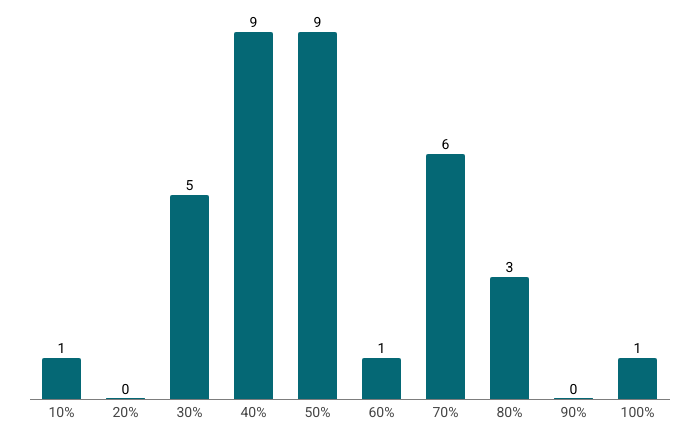
The result clearly show that Virginia localities need more time in order to fully address accessibility issues. Since the survey was limited to homepages only, it’s likely that additional barriers exist throughout the site, within features that were not tested and for WCAG Success Criteria that were not tested.
Most Common Issues
With a few exceptions, most sites included bypass links and focus indicators. Here is a review of the most frequently occurring failures.
- PDFs: 100% of the sites included an example of a non-archive PDF that is not tagged properly for accessibility. Tagged PDFs is an explicitly named requirement in the DOJ regulations.
- Landmarks: 27 of 35 sites have missing, unlabeled or incorrectly used landmarks. CivicPlus sites often include a “main” landmark without any content which can be confusing for a screen reader user who is expecting the main page content to be within the “main” landmark. Additionally, their labeling of other regions is not unique or informative enough to be helpful to assistive technology users.
- Heading Order: 26 of 35 sites used incorrect heading order.
- Bad or Missing Alt Text: 25 of 35 sites had bad or missing alt text for meaningful images. Bad alt included using the filename or some other form of non-meaningful text to identify the image (ie. homepage banner). Images that contained text within the image often did not include that same information in the alt text (ex, event dates and times)
- Color Contrast: 15 of the 35 sites had at least one example of insufficient color contrast for text, links or buttons. This is much lower than average. In general, sites built by CivicPlus did not exhibit color contrast issues unless third party tools (ex. social media feeds) were used. Sites built on other platforms had a higher occurrence of insufficient color contrast.
- Keyboard operability: 14 sites had at least one instance where a navigation menu or search feature could not be used with only a keyboard.
- Ambiguous links: 10 sites included examples of ambiguous links. Sites built on CivicPlus had the lowest occurrence of ambiguous links, but their coding style creates overly verbose labeling for links which can be annoying for screen reader users.
- Forms: Only 9 sites (26%) had issues with form labels either not being visible or properly associated with their input field. This is slightly better than the average found in the latest WebAIM Million report.
- Video Captions/Transcripts: only 6 sites included a video on the homepage. 100% of these sites failed to include captions and transcripts for the video.
Other Findings
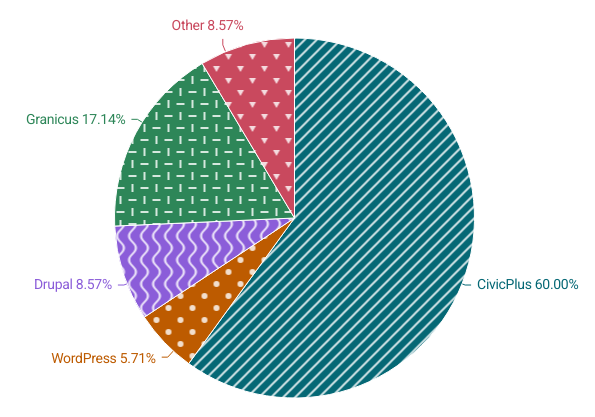
- CivicPlus has 60% of the market share for this group of websites. Granicus has 17%. The remaining sites are split between Drupal, WordPress and other/unknown platforms.
- 20 of the 35 websites include accessibility overlay products. Sites with these products still have an average failure rate of 47.5%, including the one site that has a 100% failure rate.
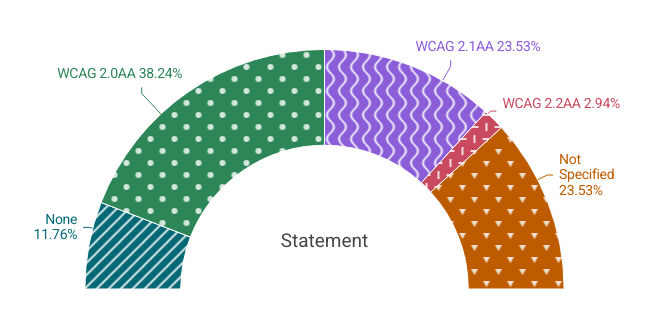
- Accessibility statements don’t reflect the current requirements to conform with WCAG 2.1AA. Only 23% site conformance with this level. One site sites WCAG 2.2AA, even though their failure rate is 70%. The remaining sites site WCAG 2.0AA, don’t specify any level or don’t have an accessibility statement.
So What Now?
Now that Virginia Title II entities have been given additional time to meet these accessibility compliance requirements, they need to make a detailed assessment of what needs to be done and create an action plan for how to how to get it done.
Step 1: Create a Full Inventory of all Digital Content
- All public facing websites, including sites for specific departments, GIS sites, sites for special events, projects, boards and commissions.
- All PDFs and other electronic documents across all of these sites
- All apps used to provide services, including bill payment, emergency notifications, and tourism programs
- All “Software as a Service” (SAAS) and third-party website tools used to provide services, including job listings and application processing, bill payments, business permitting, notifications, etc.
Step 2: Audits and VPATs
- For all websites, conduct accessibility audits that include manual testing with assistive technologies on all key pages, templates and user flows (ex. checkouts, applications).
- For all apps and SAAS sites, request a Voluntary Product Accessibility Template (VPAT) for WCAG 2.1AA from the provider of the tool.
- Manual testing should be done by an independent third party to confirm VPATs and to test tools that cannot provide a VPAT.
Step 3: Make and Share Your Plan
- Define ownership roles and responsibilities. Note Who is accountable for the overall program and who owns individual components of the plan. Define what activities, metrics and documentation they are responsible for.
- Create a timeline that prioritizes addressing the most critical barriers first, then move on to high impact issues. Once these items are addressed, move on to medium and low issues.
- Procure the necessary tools and outside expertise to help accomplish your plan (i.e software to help with large scale PDF remediation).
- Train staff on accessibility best practices and how to avoid creating new issues when creating documents, websites and pages, social media posts, etc.
- Update standard operating procedures (SOPs) for procurement, document creation, website creation and procedures that involve providing digital services and information to the public.
- Provide period updates on progress.
- Include plan for periodic retesting to confirm changes are removing barriers and that new content isn’t adding new issues.
Step 4: Ongoing Maintenance
Creating accessible content and procuring accessible tools is the new normal for Title II entities. Parts 3-7 from Step 3 need to be part of your ongoing maintenance. Localities may want to consider adopting an Accessibility Maturity Model as part of their operations.
Final Thoughts
All state and local governments have been given additional time to meet these website accessibility requirements. For localities that have been actively working towards the original deadline, keep up the momentum! For localities that haven’t started, make a plan and start executing on it as soon as possible.
If you’d like help evaluating your website or prioritizing accessibility improvements, now is a great time to start the conversation.
Ready to Get Started?
If you would like to talk about how Elevage Digital can address your specific needs, provide some details to start the conversation.
AI Disclosure: The feature image was generated by AI. The images within the content are not AI-generated. They were created by Elevage Digital. The text was written and approved by the author. AI was used for proofreading to identify grammatical errors.